Your eMSP backend, managed by your team.
Customers, tariffs, payments and invoices under your brand. Connected to your CPMS via OCPI, analysed in the dashboard.
Loading a simplified version of the eMSP backend …
With sample figures, reduced to the essentials. The real backend holds a lot more.
Know how your charging business is doing
Sessions, energy and revenue for today and any period you choose.
Today's figures, without waiting for the monthly report
See which locations and times of day are in highest demand
Export reports for controlling and management in one click
Complements your CPMS. Does not replace it.
Your CPMS keeps controlling the charging stations. The eMSP backend handles customers, tariffs, payment and invoices under your brand.
Stays in your CPMS
- Charging stations and OCPP
- Faults and maintenance
- Load management
- Technical site data
Handled by the eMSP backend
- Customers, contracts and verification
- Charge cards for customers and companies
- Tariffs with time windows and free minutes
- Payment providers and payment methods
- Invoices, credit notes and exports
- Ad-hoc charging and driver app
- Dashboard with key figures
How the two connect
Prices your team changes itself
A night price, free minutes while shopping or a parking fee against long-stay parkers: your team puts pricing ideas into practice itself, for one location or the whole network. React to purchase prices and demand without waiting for a service provider.
- Review new prices first, then take them live
- Different prices by time of day, location or connector type
- Every calculated price stays traceable when customers ask
- Energy 24.6 kWh × €0.45/kWh
- €11.07
- Charging time 2 h 15 min × €0.00/h
- €0.00
- Parking 30 min, within the 180 free minutes
- €0.00
- includes 19 % VAT
- €1.77
Invoices in your name
After charging, the invoice arrives automatically, with your logo, your sender details and your bank account. Your customers experience your brand throughout, OB7 appears on no document. Your accounting team no longer issues invoices by hand.
- Invoices and credit notes are created automatically
- Your own template per language, with live preview
- Open and paid invoices always in view
| Item | Quantity | Price | Amount |
|---|---|---|---|
| Charging session 4 Sep 2026, Rathausplatz 2 | 24.6 kWh | €0.45 | €11.07 |
| Parking beyond the free minutes | 0 min | €3.00/h | €0.00 |
The amount was collected via your stored payment method.
Your payment provider, your payment methods
People who charge spontaneously want to pay the way they do everywhere else: with Apple Pay, Google Pay or PayPal. You connect your own payment provider and decide which payment methods your customers see.
- Credit card, wallets, PayPal and direct debit
- Connected to your own payment provider
- No additional transaction fees from OB7
- LiveCredit cardvia Stripe
- LiveApple Payvia Stripe · ad-hoc charging
- LiveGoogle Payvia Stripe · ad-hoc charging
- LivePayPalvia Stripe
- Registered customersSEPA direct debitvia Stripe
- OffiDEALvia Stripe
An excerpt from the eMSP backend
A selection of what your team handles itself day to day, without a ticket to us.
Customers and service
Pricing and billing
Brand and team
Connected, not built in
The eMSP backend uses what you already have: your CPMS, your payment provider, your email service, your accounting.
CPMS
- OCPI 2.1.1
- OCPI 2.2.1
- OCPI 2.3.0
- Admin API
Payment
- Your payment provider
- Apple Pay
- Google Pay
- PayPal
- SEPA direct debit
- Credit card
Email delivery
- Amazon SES
- Microsoft 365
- Managed by OB7
Data out
- CSV
- XLSX
- JSON
- S3 bucket
- Invoice PDFs
Frequently asked questions about the eMSP backend
What operators want to know before rolling out.
Your question is missing? Write to us, the product team answers.
Get in touchDoes the eMSP backend replace my CPMS?
No. Your CPMS keeps controlling the charging stations via OCPP. The eMSP backend handles the end-customer business: customers, tariffs, payment, invoices and apps. The two systems are connected via OCPI. More about the Open Blueprint philosophy
How do charging sessions get into the backend?
Via OCPI. Your CPMS reports sessions and the final CDR. The backend prices the CDR against your tariff, and only then is the invoice created.
Who invoices the end customer?
You do. Invoices carry your name, logo, bank details and number range. OB7 does not appear on the document.
Can my team change prices without OB7?
Yes. Tariffs are created as a draft, checked and set live. Live prices stay documented unchanged; for a change you create a new draft. Time windows and free minutes are yours to set.
Which payment providers and methods are available?
You connect your own payment provider. Ad-hoc customers pay with Apple Pay, Google Pay, card or PayPal; registered customers also by SEPA direct debit. Which methods apply per location group is set in the eMSP backend. All payment methods
How are tenants and brands separated?
Each operator gets its own instance with its own database and subdomain. Within the instance, location groups separate brands, countries or subsidiaries with their own currency, VAT, time zone and invoice details. Roles and permissions control access down to the location group. More on hosting and data security
Can I export my data?
Yes. Sessions, invoices and credit notes export as CSV, XLSX or JSON, on demand or scheduled into your own S3 bucket. For your own integrations there is the admin API with API keys.
What does the dashboard show?
Sessions, energy, revenue, roaming purchase costs, average duration and utilisation, broken down by day, week, month, hour, location, connector type or payment status. For today it adds live values such as active sessions and open pre-authorisations.
Figures from live operation
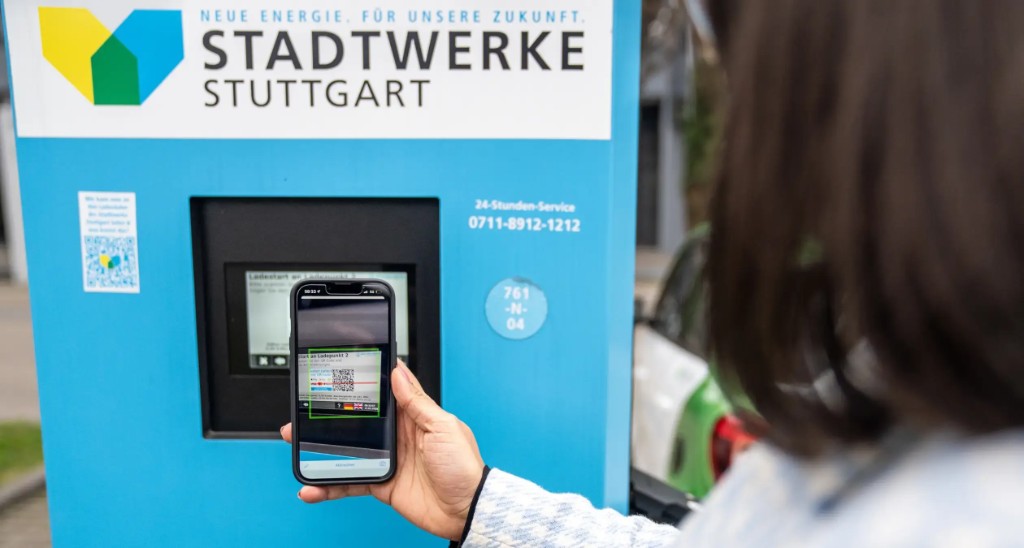
 Stadtwerke Stuttgart
Ad-hoc charging sessions up 450 %.
Zuffenhausen fast-charging park: scan the QR code, pay with Apple Pay or PayPal, charge. Tariff, payment and receipt run through the backend, under the utility's brand.
Increase at the Zuffenhausen fast-charging park after switching to the QR-code flow.
Share of payments via wallets and PayPal. Before, everything ran on credit cards.
From project start to operation under your brand.
- Stadtwerke Stuttgart
- Energieversorgung Oberhausen AG
- Hamburger Energiewerke Mobil
- Integrated with ...eRoundchargecloudEAAZECirrantic
See the backend in real operation?
In a demo we show the eMSP backend with your scenario: tariffs, invoices, payment providers and dashboard.